Replacement Keyboard Converter Gaming Part Accessories For PS3 Switch Console PC

₹3,999.00
+ ₹178.99 शिपिंग

Replacement Keyboard Converter Gaming Part Accessories For PS3 Switch Console PC

  • ब्रांड: Unbranded

Replacement Keyboard Converter Gaming Part Accessories For PS3 Switch Console PC

  • ब्रांड: Unbranded
RRP: ₹5,990.00
मूल्य: ₹3,999.00
आपकी बचत: ₹1,991.00 (33%)
द्वारा बेचा गया:
₹3,999.00
+ ₹178.99 शिपिंग

स्टॉक में है

14-दिन की रिटर्न पॉलिसी

पेमेंट के तरीके:

विवरण

Replacement Keyboard Converter Gaming Part Accessories For PS3 Switch Console PC

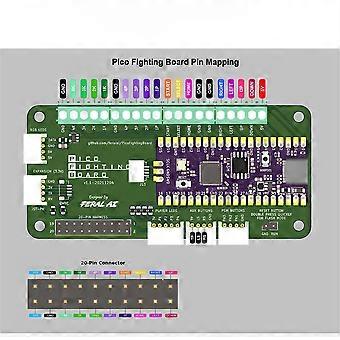
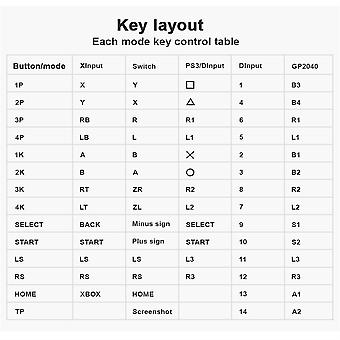
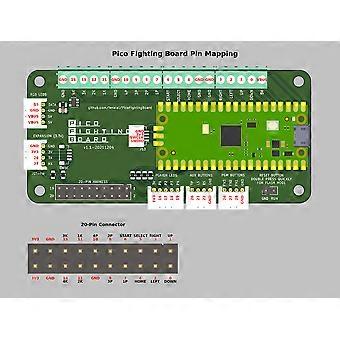
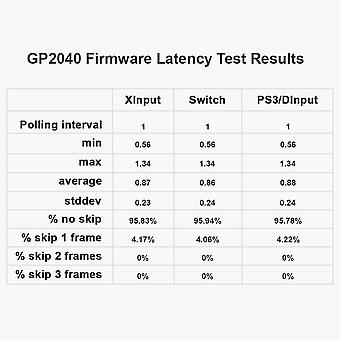
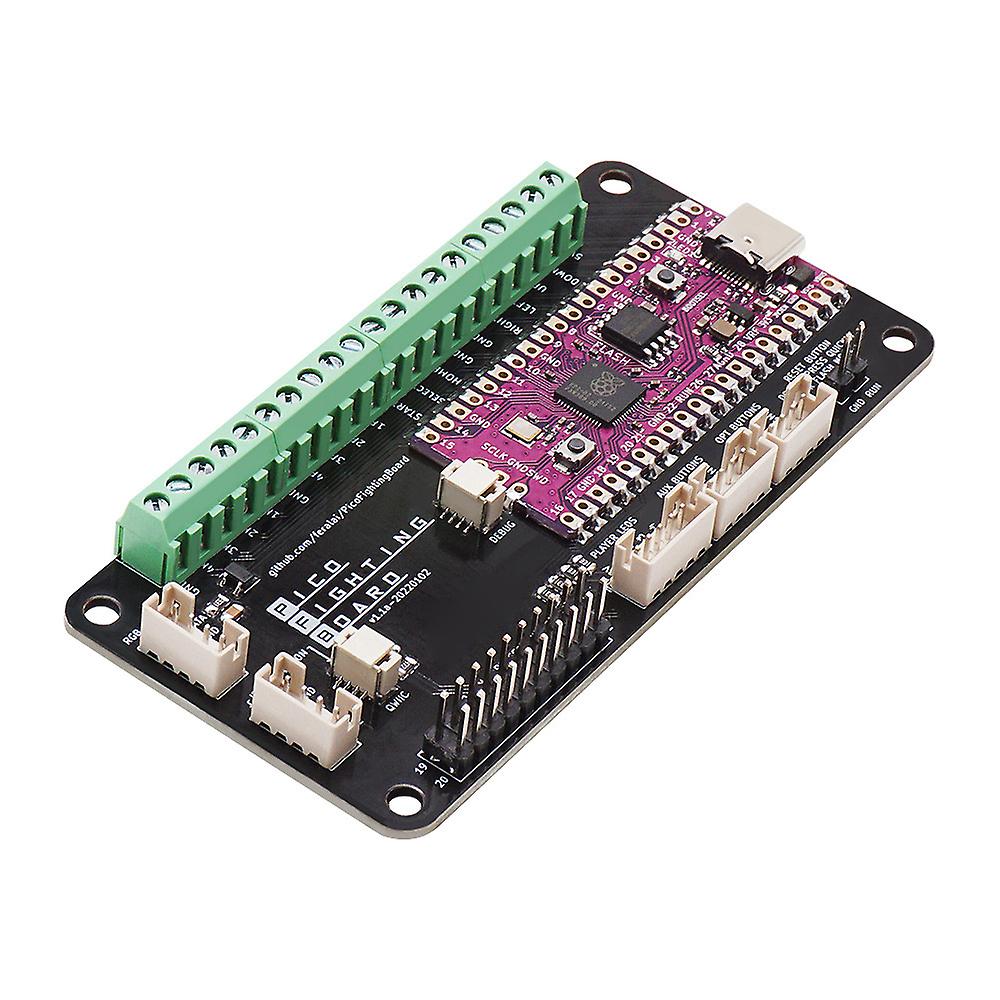
Features Input Mode To select the input mode press and hold one of the following buttons while plugging in the controller 1P-For PS3/D Input 1K-For Nintendo Switch 2k-For PC/X Input D-Pad Mode To select the active directional pad mode press while the controller is plugged in SELECT+START+DOWN-Normal arrow key operation SELECT+START+LEFT-Left joystick emulation SELECT+START+RIGHT-right joystick emulation SOCD Mode To select the active SOCD mode press while the controller is plugged in HOME+START+DOWN-Neutral(U+D=N,L+R=N) HOME+START+UP-Upward Priority(U+D=U,L+R=N) HOME+START+LEFT-last input priority RGB LED The Pico Fighting Board supports the WS2812 and similar RGB LEDs 1.SELECT+START+1P-Next animation 2.SELECT+START+1K-Previous animation 3.SELECT+START+2P-Brightness Up 4.SELECT+START+2K-Decrease the brightness 5.SELECT+START+3D-LED parameter setting 6.SELECT+START+3k-LED Parameter Setting Down 7.SELECT+START+4P-Press the parameter upward 8.SELECT+START+4K-Press Parameter Down Advanced Configuration The GP2040 firmware has a built-in configuration application. It runs from a local web server on the Pico To access the configuration application from a computer Press and hold START while plugging the controller into the computer You can now adjust controller settings,configure RGB LEDs,reset settings and more Firmware Updates The Pcio Combat Board comes with the latest GB2040 firmware pre-installed If you want to update to the latest firmware Download the latest version of the Pico Fighting Board GP2040 from the Internet Unplugging the Pico Fighting Board from the computer Press and hold the white BOOTSEL button on the Pico while plugging it into your computer Or,if you have a button connected to the reset connector you can quickly double-click that button to enter flash mode Copy the GP2040-Pico Fighting Board.uf2 file to the RPl-RP2 driver that appears when connecting the PFB Once the update is complete,the Pico Fighting Board will reboot and be detected as a controller again Specification Product Size:9.7*4.5*1.2CM Weight: 32g Package includse: 1*Rocker main control board 1 Set*Line Note: Includes only the above packaged products Due to the different monitor and light effect The actual color of the item might be slightly different from the color showed on the pictures.Thank you Please allow 1-2cm measuring deviation due to manual measurement
  • Fruugo ID: 357151246-776198136
  • EAN: 731526415831

उत्पाद सुरक्षा जानकारी

कृपया नीचे दी गई इस उत्पाद से संबंधित विशिष्ट उत्पाद सुरक्षा जानकारी देखें

निम्नलिखित जानकारी इस उत्पाद को बेचने वाले स्वतंत्र तृतीय-पक्ष खुदरा विक्रेता द्वारा प्रदान की गई है।

उत्पाद सुरक्षा लेबल

CE Mark
सुरक्षा चेतावनियाँ: Do not let your children touch this product alone to avoid swallowing or other injuries

डिलीवरी और वापसी

14 दिनों के भीतर भेजा जाएगा

  • STANDARD: ₹178.99 - के बीच वितरण मंगल 03 फ़रवरी 2026–मंगल 10 फ़रवरी 2026

चीन से शिप हो रहा है।

हम आपके द्वारा ऑर्डर किए गए उत्पादों को पूरी तरह से और आपके विनिर्देशों के अनुसार डिलीवर करने की पूरी कोशिश करते हैं। हालाँकि, यदि आपको अधूरा ऑर्डर या आपके ऑर्डर से कोई अलग आइटम प्राप्त होता है या किसी अन्य कारण से यदि आप अपने ऑर्डर से संतुष्ट नहीं हैं तो आप ऑर्डर या ऑर्डर में शामिल कोई भी उत्पाद वापस कर सकते हैं और आइटम के लिए पूर्ण रिफ़ंड प्राप्त कर सकते हैं। सम्पूर्ण वापसी पॉलिसी दिखाएँ

उत्पाद अनुपालन विवरण

कृपया नीचे दी गई इस उत्पाद से संबंधित विशिष्ट अनुपालन जानकारी देखें।

निम्नलिखित जानकारी इस उत्पाद को बेचने वाले स्वतंत्र तृतीय-पक्ष खुदरा विक्रेता द्वारा प्रदान की गई है।

निर्माता:
नीचे Fruugo पर बिक्री किए जाने वाले संबंधित उत्पाद निर्माता के संपर्क विवरण की जानकारी संबधी सूचना है।

  • JUSHI MAOYI
  • SHENZHEN JUSHI MAOYI YOUXIANGONGSI
  • Room B208, 4th Floor,
  • Niulanqian Building Minzhi Street,
  • Longhua District Shenzhen Guangdong
  • Shenzhen
  • China
  • 518000
  • chenyq1003@sina.com
  • 8615999604495

यूरोपीय संघ(EU) में जिम्‍मेदार व्यक्ति:
नीचे यूरोपीय संघ में जिम्मेदार व्यक्ति की संपर्क जानकारी संबंधी सूचना है। जिम्मेदार व्यक्ति यूरोपीय संघ में स्थित पदनामित आर्थिक ऑपरेटर है जो यूरोपीय संघ में बिक्री किए जाने वाले संबंधित उत्पाद संबंधी अनुपालन दायित्वों के लिए जिम्मेदार है।

  • eVatmaster Consulting
  • eVatmaster Consulting GmbH
  • Bettinastr.30,
  • 60325 Frankfurt am Main
  • Germany
  • Germany
  • 60325
  • contact@evatmaster.com
  • 496995179070